Welcome to the Cumulocity Digital Twin Manager (DTM) application.
This application allows you to create and manage assets around your physical connected devices in Cumulocity using a digital representation of a physical hierarchy of assets and devices. Here, assets can be used to structure and describe devices in logical hierarchies as encountered in the real world environment to help with visualizing the hierarchy in a digital setting.
Once the asset hierarchy is created in the DTM application, the hierarchy can be applied to other applications such as the Cumulocity Cockpit. It saves a lot of time and effort, as the hierarchy is created only once and can be used directly in other Cumulocity hosted applications.
The home dashboard of the DTM application gives an overview of the application. You can see the number of asset definitions, property definitions and assets available at a glance. You can add the definitions and assets using the quick links.
The home dashboard can be edited and designed individually according to your needs. You can add, remove or change widgets being displayed here.
For details on editing a dashboard, refer to Working with dashboards.
Requirements
Your tenant must be subscribed to the Digital Twin Manager application, the Dtm-plugins extension, and the Dtm microservice.
Related topics
See Subscribing applications for more information on how to access the DTM application in your tenant.
Concepts
Digital Twin
A digital twin is a virtual representation of a physical object or system. It is typically used in the context of the Internet of Things (IoT) to help visualize and analyze how a physical object is performing, or to predict how it might behave in the future.
You can use digital twins to simulate and test the performance of complex systems, such as buildings, factories, or even entire cities. By using digital twins, engineers and designers can better understand how a system works and identify potential problems before they occur.
In the Digital Twin Manager application, one asset represents one digital twin.
Digital twin attributes
A digital twin contains a number of attributes:
It represents a unique physical asset.
It is associated with a single, specific instance of a physical asset.
It continuously collects data (through sensors, devices, and so on).
It is continuously connected to the physical asset, updating itself with any change to the asset’s state, condition, and context.
It provides value through visualization, analysis, prediction, and optimization
Asset Hierarchy
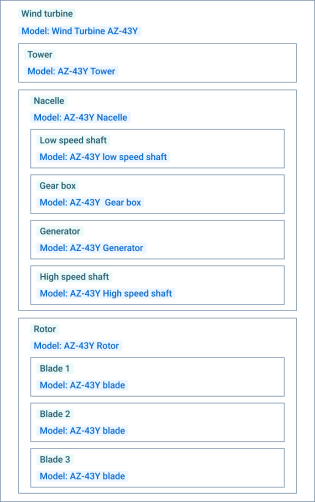
An asset hierarchy is a structure that organizes multiple assets and devices into a hierarchy, allowing for the visualization and management of complex systems.
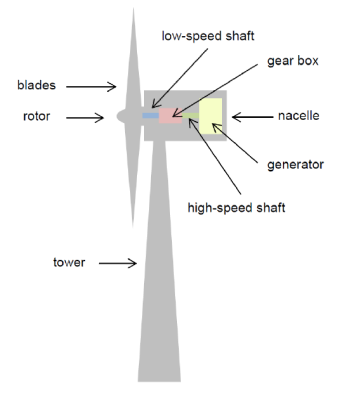
To create an asset hierarchy, execute the following steps. The example is based on a wind turbine as a physical device.
First identify the key systems, processes, and components to be included in order to define the scope of your asset hierarchy.
Based on your definitions create the hierarchy of all digital twins.
Determine the level of detail needed for each system, process, and component in the hierarchy. This helps to determine the level of accuracy and complexity required for each asset definition. For a wind turbine this includes, for example, the tower’s height, the length of the blade and so on.
To portray the correct structure, first create a property definition for each component in the Property definitions page, see To create a property definition for details. The property definitions are later used in creating the individual asset definitions.
To create an asset definition work from the smallest component to the largest. For a wind turbine that means to start with the asset definition “blade”, followed by “rotor”, “tower”, and “nacelle” and finally “wind turbine”. Assign the required property definition to each asset definition as well as the allowed child asset definitions (for example, a wind turbine requires a rotor, which in turn requires rotor blades). See To create an asset definition for details.
Afterwards, add the necessary asset instances. This process starts from the outer most level (for example, the wind turbine) and ends at the deepest level (for example, the blades).
Test and validate the asset hierarchy to ensure that it accurately represents the real-world system or process. This can involve simulating different scenarios and comparing the results to real-world data.
Continuously update and maintain the asset hierarchy as changes occur in the real-world system or process. This ensures that the hierarchy remains accurate and up to date.